Google Cloud Platform
Portefaix provides a complete Terraform-based infrastructure stack for GCP, deploying a production-grade GKE cluster with all supporting cloud resources: VPC, IAM, KMS, Cloud DNS, Artifact Registry, and more.
Architecture
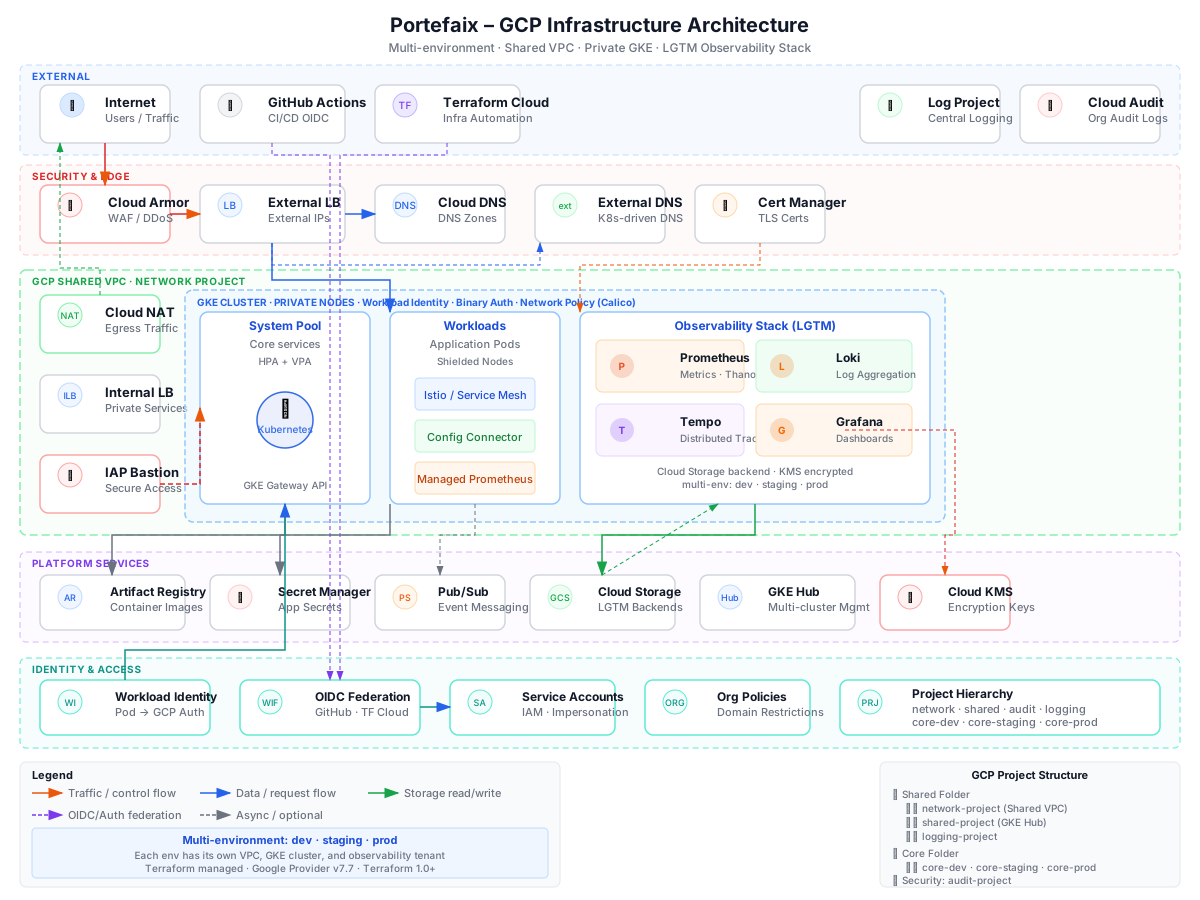
The GCP infrastructure stack is structured around these core components:
| Component | GCP Service | Purpose |
|---|---|---|
| Kubernetes cluster | GKE (Autopilot or Standard) | Container orchestration |
| Networking | VPC, Subnets, Cloud NAT | Private cluster networking |
| Identity | Workload Identity, IAM | Pod-level GCP authentication |
| Secrets | Cloud KMS, Secret Manager | External Secrets Operator with GCP Secret Manager |
| DNS | Cloud DNS | External-DNS managed records |
| Registry | Artifact Registry | Container image storage |
| Storage | Cloud Storage (GCS) | Terraform state, Velero backups, Loki |
Prerequisites
- GCP project with billing enabled
gcloudCLI authenticated:gcloud auth application-default login- Terraform ≥ 1.5
kubectlandhelm- Required APIs enabled (see below)
Enable GCP APIs
gcloud services enable \
  container.googleapis.com \
  compute.googleapis.com \
  cloudkms.googleapis.com \
  dns.googleapis.com \
  artifactregistry.googleapis.com \
  secretmanager.googleapis.com \
  iam.googleapis.com
Deploying Infrastructure
1. Configure Variables
# infrastructure/gcp/<env>/terraform.tfvars
project_id  = "my-gcp-project"
region      = "europe-west1"
environment = "production"
cluster_name = "portefaix-production"
2. Initialize and Apply
cd infrastructure/gcp/production

terraform init \
  -backend-config="bucket=<tfstate-bucket>" \
  -backend-config="prefix=portefaix/gcp/production"

terraform plan -out=tfplan
terraform apply tfplan
3. Configure kubectl
gcloud container clusters get-credentials \
  portefaix-production \
  --region europe-west1 \
  --project my-gcp-project
Workload Identity
Portefaix configures Workload Identity so Kubernetes Service Accounts map directly to GCP Service Accounts — eliminating the need to manage static credentials inside the cluster.
# Each component gets its own GSA
gcloud iam service-accounts create external-dns \
  --project my-gcp-project

# Bind to Kubernetes SA via Workload Identity
gcloud iam service-accounts add-iam-policy-binding \
  external-dns@my-gcp-project.iam.gserviceaccount.com \
  --role roles/iam.workloadIdentityUser \
  --member "serviceAccount:my-gcp-project.svc.id.goog[external-dns/external-dns]"
Compliance Testing with InSpec
Portefaix uses Chef InSpec to validate that the GCP infrastructure meets security and compliance requirements:
# Run InSpec tests against GCP
inspec exec portefaix-inspec-gcp \
  -t gcp:// \
  --input project_id=my-gcp-project \
  --reporter cli junit:reports/inspec-gcp.xml
Compliance checks cover: GKE configuration, VPC settings, IAM bindings, KMS key rotation, and more.
Destroying Infrastructure
Warning: This will permanently destroy all resources including the GKE cluster, all data in GCS buckets, and DNS records. Ensure all important data is backed up.
terraform destroy -var-file=terraform.tfvars