Microsoft Azure
Portefaix deploys a production-ready AKS cluster on Azure with a complete supporting stack: Virtual Networks, Azure Active Directory integration, Azure Key Vault, Azure DNS, ACR for container images, and Azure Storage for Terraform state and backups.
Architecture
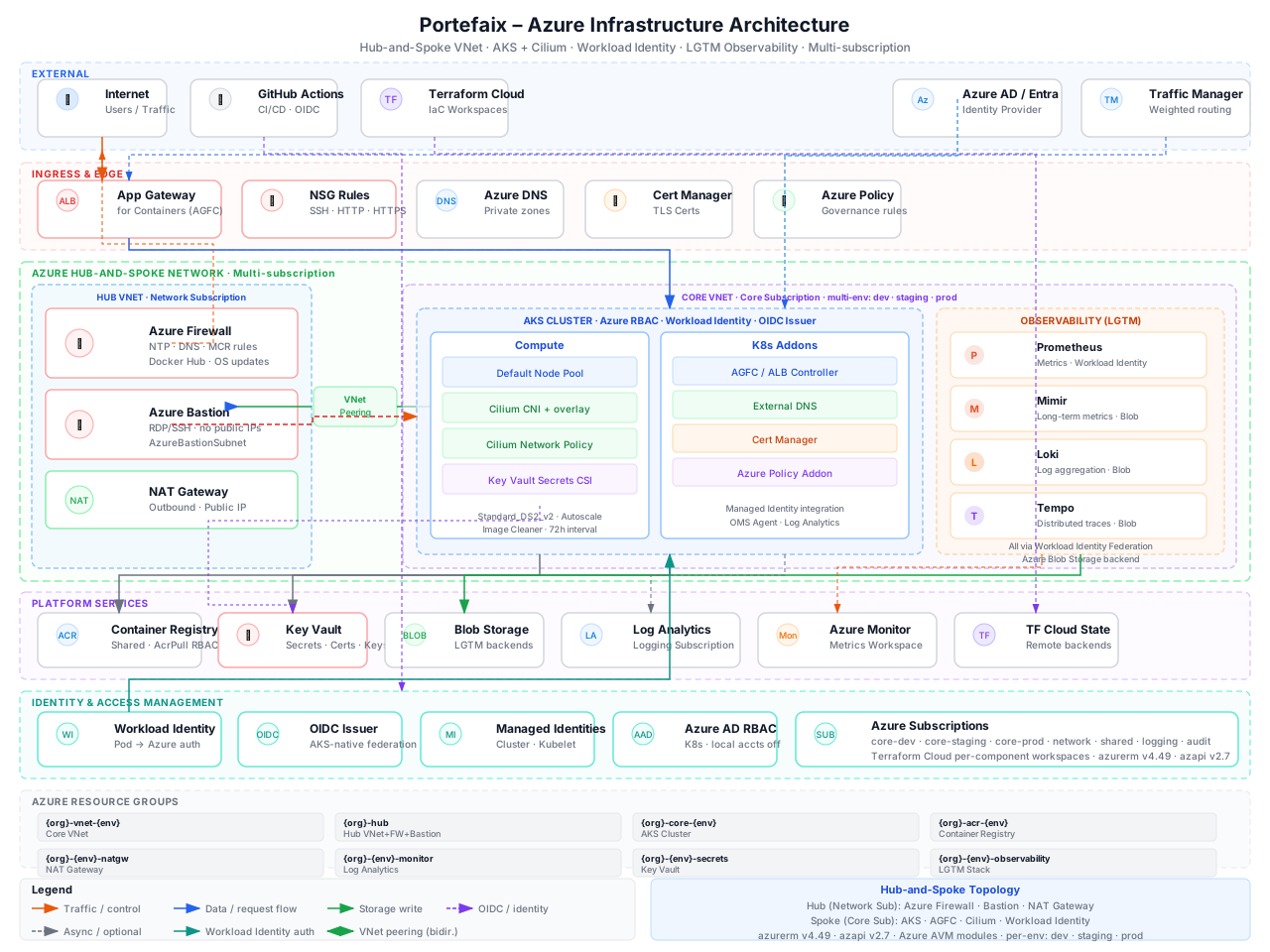
| Component | Azure Service | Purpose |
|---|---|---|
| Kubernetes cluster | AKS | Container orchestration |
| Networking | VNet, Subnets, NAT Gateway | Private cluster networking |
| Identity | Managed Identity, AAD Workload Identity | Pod-level Azure authentication |
| Secrets | Azure Key Vault | External Secrets Operator with Azure Key Vault |
| DNS | Azure DNS | External-DNS managed records |
| Registry | Azure Container Registry (ACR) | Container image storage |
| Storage | Azure Blob Storage | Terraform state, Velero backups, Loki |
Prerequisites
- Azure subscription with Owner or Contributor access
- Azure CLI authenticated:
az login - Terraform ≥ 1.5
kubectlandhelm
Deploying Infrastructure
1. Configure Variables
# infrastructure/azure/<env>/terraform.tfvars
subscription_id = "xxxxxxxx-xxxx-xxxx-xxxx-xxxxxxxxxxxx"
location        = "West Europe"
environment     = "production"
cluster_name    = "portefaix-production"
2. Create Remote State Backend
az group create --name tfstate-rg --location "West Europe"
az storage account create \
  --name portefaixtfstate \
  --resource-group tfstate-rg \
  --sku Standard_LRS

az storage container create \
  --name tfstate \
  --account-name portefaixtfstate
3. Initialize and Apply
cd infrastructure/azure/production

terraform init \
  -backend-config="resource_group_name=tfstate-rg" \
  -backend-config="storage_account_name=portefaixtfstate" \
  -backend-config="container_name=tfstate" \
  -backend-config="key=portefaix/azure/production.tfstate"

terraform plan -out=tfplan
terraform apply tfplan
4. Configure kubectl
az aks get-credentials \
  --resource-group portefaix-production-rg \
  --name portefaix-production
Workload Identity
Portefaix uses the Azure Workload Identity to grant Kubernetes workloads access to Azure resources via federated credentials — no static credentials required.
# Enable OIDC issuer on AKS
az aks update \
  --resource-group portefaix-production-rg \
  --name portefaix-production \
  --enable-oidc-issuer \
  --enable-workload-identity
Key Vault Integration
Azure Key Vault is used as the secrets backend for the External Secrets Operator. Secrets are stored in Key Vault and synchronised into Kubernetes at runtime — nothing is committed to Git:
# SecretStore — Azure Key Vault backend
apiVersion: external-secrets.io/v1beta1
kind: SecretStore
metadata:
  name: azure-store
  namespace: my-app
spec:
  provider:
    azurekv:
      vaultUrl: "https://portefaix-kv.vault.azure.net"
      authType: WorkloadIdentity
      serviceAccountRef:
        name: external-secrets-sa
Note: The Workload Identity used by the External Secrets Operator must have
Key Vault Secrets User permission on the Key Vault to read secrets.
Compliance Testing
# Run InSpec tests against Azure
inspec exec portefaix-inspec-azure \
  -t azure:// \
  --input subscription_id=xxxxxxxx-xxxx-xxxx-xxxx-xxxxxxxxxxxx \
  --reporter cli junit:reports/inspec-azure.xml